

共计 1400 个字符,预计需要花费 4 分钟才能阅读完成。
查看显卡
# nvidia-smi -L
GPU 0: NVIDIA RTX PRO 6000 Blackwell Server Edition (UUID: GPU-41e0e681-f017-4fd7-e837-0f3d20847494)
GPU 1: NVIDIA RTX PRO 6000 Blackwell Server Edition (UUID: GPU-55d00feb-2410-9ef9-92ff-dc2093029544)
GPU 2: NVIDIA RTX PRO 6000 Blackwell Server Edition (UUID: GPU-82f52255-a755-291c-5d6a-4416176cb000)
GPU 3: NVIDIA RTX PRO 6000 Blackwell Server Edition (UUID: GPU-8d2a92e4-5378-36f1-d3e5-f1fbf70cb92f)
GPU 4: NVIDIA RTX PRO 6000 Blackwell Server Edition (UUID: GPU-b209bc35-5e51-cb7f-6d98-4b52248bbbc0)
GPU 5: NVIDIA RTX PRO 6000 Blackwell Server Edition (UUID: GPU-89451d17-cc88-b8b0-3914-e1d08be2e20d)
GPU 6: NVIDIA RTX PRO 6000 Blackwell Server Edition (UUID: GPU-a0d8bf78-0e9a-601a-6678-b1410f34b5bb)
GPU 7: NVIDIA RTX PRO 6000 Blackwell Server Edition (UUID: GPU-374ea815-5586-36bb-28e8-33b88c003f54)
开启 0 号卡 mig
# nvidia-smi -i 0 -mig 1
Enabled MIG Mode for GPU 00000000:16:00.0
All done.
查看当前显卡的 mig 规格
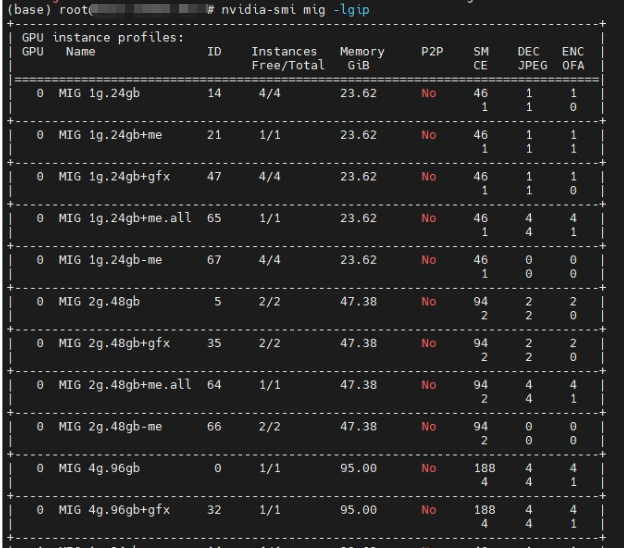
分割出两块 48GB 的虚拟显卡
# nvidia-smi mig -cgi 5,5 -C -i 0
Successfully created GPU instance ID  1 on GPU  0 using profile MIG 2g.48gb (ID  5)
Successfully created compute instance ID  0 on GPU  0 GPU instance ID  1 using profile MIG 2g.48gb (ID  1)
Successfully created GPU instance ID  2 on GPU  0 using profile MIG 2g.48gb (ID  5)
Successfully created compute instance ID  0 on GPU  0 GPU instance ID  2 using profile MIG 2g.48gb (ID  1)
查看显卡
# nvidia-smi -L
GPU 0: NVIDIA RTX PRO 6000 Blackwell Server Edition (UUID: GPU-xxxx)
  MIG 2g.48gb     Device  0: (UUID: MIG-xxxx)
  MIG 2g.48gb     Device  1: (UUID: MIG-xxxx)
注:启动模型服务的容器时可能需要用到的两个参数
-e PYTORCH_CUDA_ALLOC_CONF=expandable_segments:True -e CUDA_MODULE_LOADING=LAZY正文完
